Bubbie Brush Stroke Clipart: Creative Design Elements
When you are building a brand identity or crafting a unique piece of editorial design, the smallest details often carry the most weight. Digital assets that feel organic and handcrafted can break the monotony of rigid grid systems and standard vector shapes. This is where the Bubbie Brush Stroke Clipart Element collection steps in. It is not just a set of images; it is a toolkit for adding texture, movement, and a human touch to your creative projects. Whether you are a seasoned graphic designer looking to speed up your workflow or a small business owner creating your first batch of marketing materials, understanding how to leverage these specific visual elements can elevate your output from generic to memorable.
Understanding the Visual Personality of Bubbie Brush Strokes
The appeal of the Bubbie Brush Stroke Clipart Element lies in its imperfection. In a digital world dominated by clean lines and perfect geometry, brush strokes offer a sense of authenticity and warmth. These elements mimic the natural variation of paint hitting paper, with tapered edges, varying opacity, and organic curves. This aesthetic aligns closely with the popularity of handwritten font styles and script font typography, which have dominated modern typography trends for several years. However, unlike a typeface that dictates specific letterforms, these clipart elements provide flexibility. You can rotate, scale, and layer them to create custom shapes that no standard serif font or sans serif font could achieve on their own.
Visually, these strokes act as dynamic anchors. They draw the eye and guide the viewer’s attention across a layout. When used in logo design, a well-placed brush stroke can soften a corporate image, making a brand feel more approachable and artisanal. For packaging design, they add a tactile quality that suggests care and craftsmanship, even if the product is mass-produced. The key characteristic here is versatility. Because each stroke is unique, you avoid the repetitive look that often plagues stock graphics. This uniqueness is crucial for maintaining a distinct brand identity in crowded markets like Etsy, Instagram, or local farmer’s markets.
What Is Included and How to Prepare Your Files
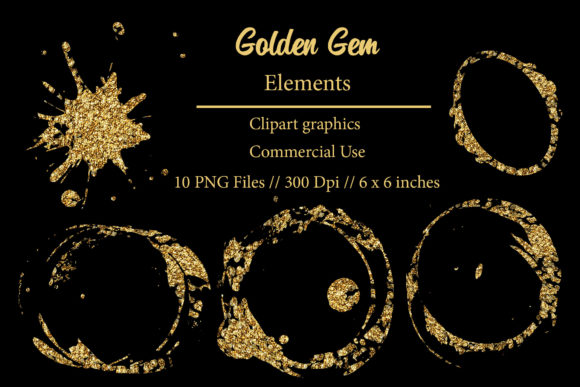
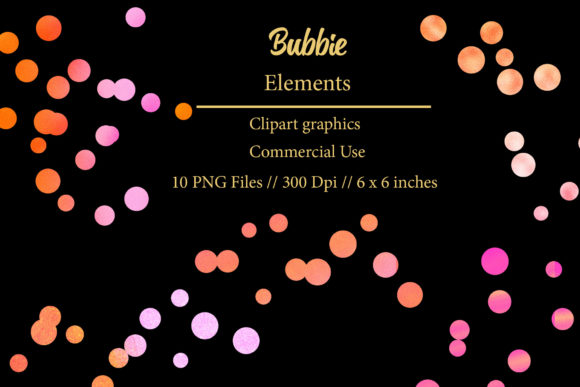
Before diving into design applications, it is essential to understand the technical specifications of what you are purchasing. This is a digital product, meaning there is no physical shipment. Upon completion of your transaction, you will receive a .ZIP file containing 10 Individual Transparent PNG Elements. It is critical to extract this folder after downloading to access the individual files. Each element is rendered at 300 dpi with dimensions of 6 x 6 inches.
The resolution of 300 dpi is the industry standard for high-quality printing. This ensures that whether you are printing business cards, invitations, or large-format posters, the edges of the brush strokes remain crisp and free of pixelation. The transparent background is equally important. It allows you to place these elements over any color, photo, or pattern without a white box surrounding them. This transparency is vital for web design and social media graphics, where backgrounds vary widely. Think of these PNGs as digital stickers. You can drag and drop them into software like Photoshop, Canva, Procreate, or Illustrator (by placing them) to instantly add flair to your composition.
Practical Applications Across Creative Industries
The utility of the Bubbie Brush Stroke Clipart Element extends far beyond simple decoration. Here is how different creators can integrate these assets into their workflows:
- Planner and Stationery Design: Use the strokes to create dividers, headers, or decorative corners in printable planners. They add a playful yet organized feel to daily layouts.
- Sublimation and Apparel: Because the files are high-resolution PNGs, they are ideal for sublimation designs on mugs, t-shirts, and tote bags. Layer a brush stroke behind a bold display font to create a striking graphic for apparel.
- Invitations and Event Stationery: For weddings or birthday parties, these elements can frame text or highlight key details like dates and names. They pair beautifully with elegant script fonts to create a balanced, romantic aesthetic.
- Blog Graphics and Web Decor: Break up long blocks of text on your website with subtle brush underlines or accents. This improves readability and keeps the user engaged without overwhelming the content.
- Advertising and Marketing Materials: In social media ads, use the strokes to highlight discount percentages or call-to-action buttons. The organic shape stands out against the rectangular norms of digital ads.
For entrepreneurs selling DIY projects, these elements can be incorporated into digital papers or used as embellishments in scrapbooking kits. The key is to experiment with blending modes in your design software. Setting a brush stroke to "Multiply" can make it look like ink soaked into paper, while "Screen" can give it a glowing, ethereal quality.
Enhancing Brand Perception and Visual Hierarchy
Using consistent visual elements like the Bubbie Brush Stroke Clipart Element contributes significantly to brand recognition. When customers see the same style of graphical accent across your business cards, website, and packaging, it creates a cohesive narrative. This consistency builds trust. It signals that you pay attention to detail and have a defined aesthetic. In terms of visual hierarchy, these strokes can serve as non-verbal cues. A thick, bold stroke under a headline tells the reader, "This is important." A delicate, thin stroke next to a testimonial adds emphasis without shouting.
Moreover, these elements help humanize your brand. In an era where consumers crave connection, overly polished, corporate visuals can sometimes feel cold. The imperfect, hand-painted look of these brush strokes suggests a human hand was involved in the creation process. This perception is invaluable for small businesses, artisans, and coaches who rely on personal connection to drive sales. It bridges the gap between digital convenience and analog warmth.
Tips for Effective Font Pairing and Layout
While these are graphic elements, they interact heavily with typography. To maximize their impact, consider your font pairing carefully. Since the brush strokes have a casual, artistic vibe, they pair exceptionally well with clean sans serif fonts for a modern contrast, or with structured serif fonts for a classic, editorial look. Avoid pairing them with overly chaotic or illegible scripts, as this can clutter the design and reduce readability.
When incorporating these into commercial font projects or client work, always test the scale. At 6x6 inches, they are versatile, but scaling them up too much may reveal the limits of raster-based PNGs. Keep them within reasonable bounds to maintain sharpness. Additionally, use white space generously. Let the brush strokes breathe. Crowding them with text or other graphics diminishes their artistic value. Treat each stroke as a focal point, not just background noise.
Ultimately, the Bubbie Brush Stroke Clipart Element is a practical addition to any designer’s library of design assets. It offers a quick, professional way to add character and depth to a wide range of projects. By understanding its technical specs and creative potential, you can transform simple layouts into engaging visual stories that resonate with your audience. Whether you are designing a premium font showcase or a simple thank-you card, these elements provide the finishing touch that makes your work stand out.